See every request.
Test with intent.
Vector is a free, native web-security workbench — an intercepting proxy and toolkit for authorized testing that files findings straight into your Pratimāna Matrix programs.
The macOS builds are signed and notarized; the Windows build is not code-signed yet. How to open Vector the first time
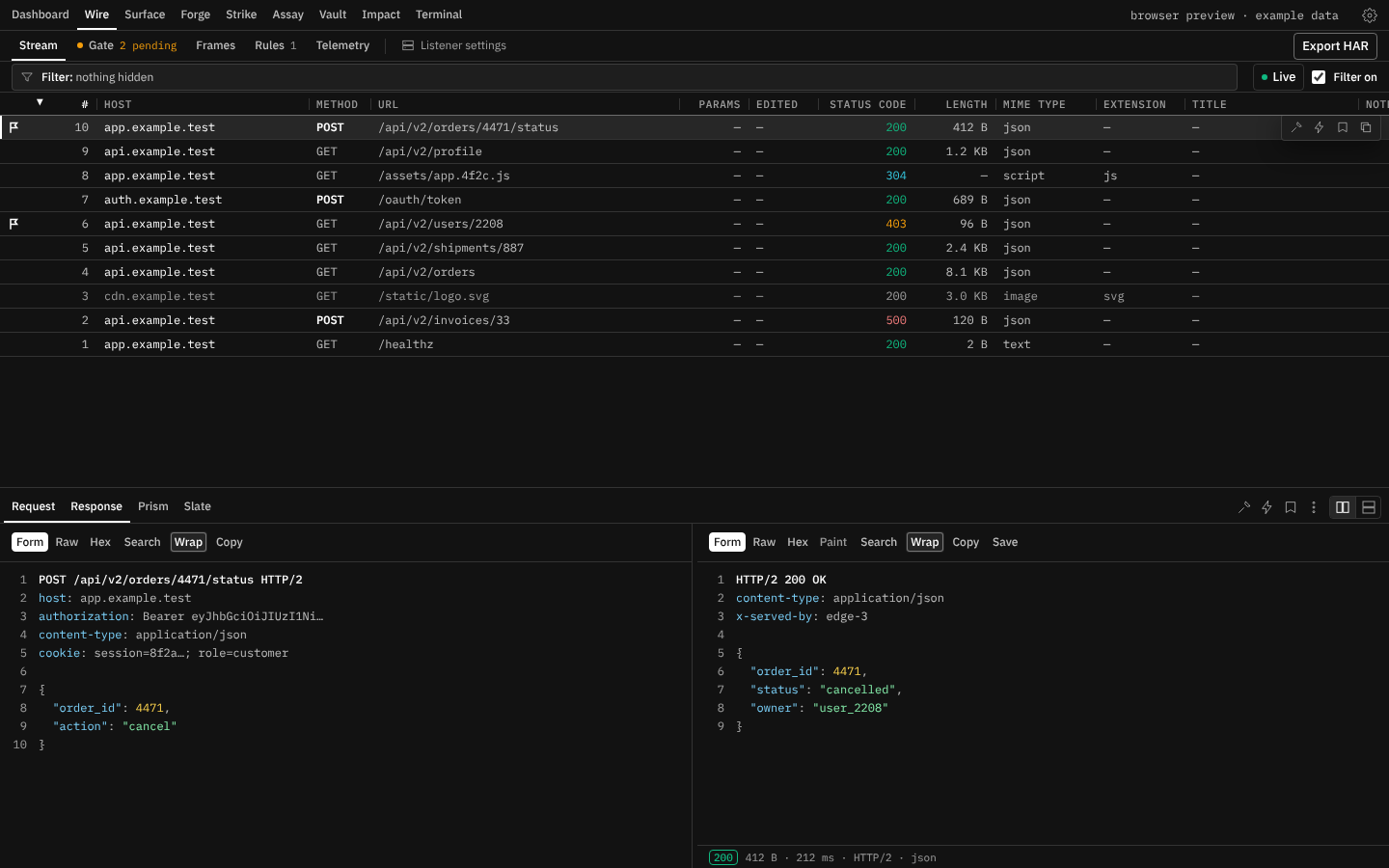
Every tool on one dock.
Nine places behind a single native shell, each holding the screens that belong together — capture, craft, and analyse without leaving the app.
Dashboard
Where the engagement stands
- DashboardProjects, proxy, scope, store and workers
Wire
See the traffic
- StreamThe live ledger of exchanges
- GateRequests and responses held before they go on
- FramesSockets, event streams and gRPC calls, and what crossed them
- RulesWhat to rewrite, drop and tag as traffic passes
- TelemetryProxy event journal
Surface
Know the target
- MapHost tree of recorded traffic
- CrawlWalk the application and map what it links to
- ReconContent discovery, names, ports and what a host runs
- ScopeWhat is in bounds, and the guardrails
Forge
Work a request by hand
- BenchCraft and replay requests
- NexusREST and GraphQL, gRPC, WebSockets and SSE
Strike
Let an engine send
- FuzzPayload spraying across marker positions
- ShadowAccess-control checks, passive and by replay
- TripwireOut-of-band listener
- PulseProbe a request’s inputs with benign checks
Assay
Work on bytes
- AssayWork on bytes: chains that encode, decode, hash, compress, compare and measure
Vault
Who Vector is while it sends
- JarSession jar and what carries it
- Sign-inRecord a login, replay it when it expires
- TokensTokens and keys seen in traffic, and OAuth grants
- FleetHeadless daemon on a VPS
- RegistryExtensions and plugins
Impact
Keep and file what you find
- StashBookmarked findings, and the report they export to
- ProofReproduction scripts from a finding
- MatrixSign in and file findings
Terminal
Your own tools, through Vector or around it
- TerminalShells on this machine, routed through Vector or direct
Built to be fast, small, and yours.
Native and small
The proxy and storage are compiled Rust behind a lightweight Tauri shell — no JVM, no heavy runtime.
Content-addressed storage
Bodies are stored once by hash, metadata in SQLite. A long engagement stays small on disk and search stays quick.
Files into Matrix
Turn a captured exchange into a report in your Pratimāna Matrix program — request, response and CVSS vector carried across, and the asset checked against the program's scope.
Get Vector for your platform.
Free to download and run. Point your browser at Vector's proxy and start reading traffic.
Sign in to download. Vector is free, and each download asks for a Pratimāna account. Choose a file and you are sent to sign in, then straight back to the download.
Sign inmacOS
Your systemWhich Mac, and the first launch
To see which Mac you have, open the Apple menu → About This Mac: a Chip line, naming an Apple chip such as the M1, means Apple silicon; a Processor line naming Intel means Intel. The Intel build also runs on Apple silicon, through Rosetta 2 and more slowly; the Apple silicon build does not open on an Intel Mac.
Both builds are signed with Pratimāna’s Apple Developer ID and notarized by Apple, so the first launch asks only what macOS asks of any app from the internet: choose Open.
Windows
Your systemFirst launch on Windows
SmartScreen shows “Windows protected your PC”; choose More info → Run anyway.
Linux
Your systemFirst launch on Linux
Install the .deb with sudo apt install ./Vector-Linux-x64.deb, or the .rpm with sudo dnf install ./Vector-Linux-x64.rpm. The .AppImage needs chmod +x once, then runs as it is.
The macOS builds are signed and notarized; the Windows build is not code-signed yet. Apple’s notary service has checked each Mac build before it is published. Vector is not enrolled in Microsoft’s signing programme yet, so Windows has nobody to check its download against and says so. That warning is about provenance, not about anything found in the app — and worth treating with the suspicion it deserves from anyone else. The steps to open each build the first time sit under its download above.
For authorized testing only
Vector is a security-testing tool. Use it only against systems you own or have explicit permission to test — your own applications, or a program whose scope authorizes it. An intercepting proxy inspects only traffic you deliberately route through it, on machines you control.